Headroom: an open source app for training, recovery and nutrition
Contents
Every morning I want one answer: how much training do I have room for today, given how I slept, how loaded my last month has been, whether my knee is complaining, and the fact that I have about 50 minutes before work.
No single app I tried answered that. Runna plans running and calls my Sunday tennis a rest day. The gym apps don't know about my runs, and the food apps are thin on the dal and sabzi I actually eat. So I built the thing, called it Headroom after the question it answers, and as of today the whole codebase is public at github.com/manasmehrotra3/headroom.
It's an Expo and React Native app, TypeScript throughout, and it runs on both Android and iPhone. It's MIT licensed, so build it for yourself, fork it, or lift pieces out of it.
What it does on a normal day
The Today screen opens with my readiness and sleep scores, then training load and VO2 max, steps against goal, a quick morning check-in, and the session the plan has for me. Below that is everything I actually did today with time, distance, heart rate and effort, then calories and protein against target.
A 6:30 notification gives me the same thing as one line before I open anything. An 8pm one previews tomorrow's session and meals.
The Train tab is the week. Tap any day and you see the whole session: exercises with sets, reps, rest, which machine to look for and a suggested weight from my last few sessions. For a run it's the structure step by step with VDOT paces. For a ride, heart rate zones and cadence. If I'm sick, travelling, or just want to move Wednesday to Thursday, the week rebalances without cramming everything into Friday.
On strength days a full screen workout player takes over: one exercise at a time with movement frames and cues, steppers prefilled from last time, an auto rest timer that vibrates, and a session clock running against the 50 minute cap.
Food is calorie and protein rings with about 180 Indian vegetarian foods in household servings, plus recipes, favourites, copy yesterday, barcode scanning and a USDA search. It writes a weekly meal plan around a protein anchor per meal, with no repeats inside three days, and builds the grocery list from it.
Progress has the 7 day average weight trend, waist, VO2 max over 90 days, on device progress photos, and a Sunday review: weight, strength PRs, pace at similar heart rate, adherence, and next week's plan with every change explained.
Your Garmin numbers on the home and lock screen
This is the part I use most, and the one I couldn't get anywhere else. My watch knows my steps and my VO2 max, but Garmin Connect doesn't offer a single home screen widget, on Android or iPhone, and people have been asking for one on Garmin's forums for years. Seeing either one means opening the app, waiting for it to sync, and tapping through to the right screen.
Headroom puts both on the home screen, and on the lock screen where the phone allows it. Unlocking the phone is enough to see where the day stands, and I've stopped opening Garmin Connect every time I want to check a number.
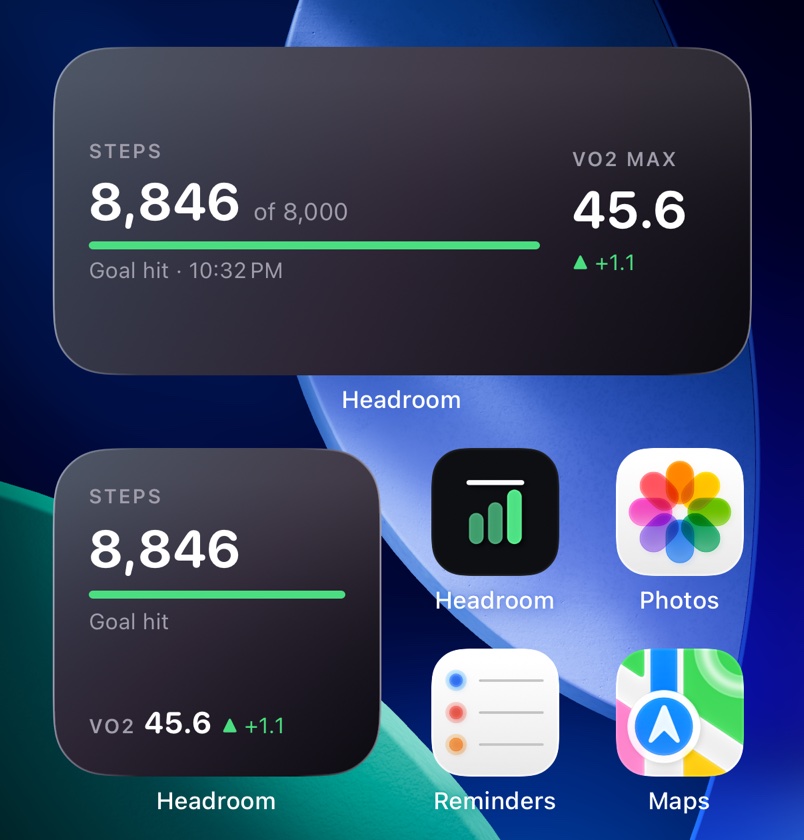
The medium size gives steps the big line on the left, with the goal, a progress bar and the time of the last refresh underneath, and VO2 max on the right with its change. The small size stacks the same numbers. On Android it's a single resizable widget built to sit next to the phone's own clock and weather widget: a translucent capsule the wallpaper tints, with VO2 max in a gold disc on the right.
It's native on both platforms. On Android it's Kotlin that reads the app's database directly. On iPhone it's a WidgetKit extension in small and medium sizes, and since it can't open the database, the app writes a small snapshot to a shared App Group after each sync.
Keeping it fresh took more work than drawing it:
- It redraws on every sync: when you open the app, when you come back to it, and when the background task runs. A small native module asks the OS for the redraw. Without it, Android only refreshes widgets on its own half hourly schedule, and the widget sat showing old numbers long after the app had new ones.
- The footer shows the refresh time, so you always know how old the numbers are.
- The lock screen depends on your phone. Google added lock screen widgets for phones in Android 16 QPR2, and some manufacturer launchers only allowed their own apps there until later. The widget declares itself for both surfaces, so it shows up wherever the launcher lets it.
Every change comes with a reason
This is the part I care most about. The plan engine is deterministic: a set of rules that run in a fixed order, and every rule that changes a session writes down why.
The order goes like this. Pain first. Then deload, every fourth week or after three low readiness days. Then trim if my acute to chronic workload ratio is out of the 0.8 to 1.3 range. Run and bike volume can't climb more than 10% a week. Monday gets lighter after a long or hard tennis session. No heavy legs before a run or long ride. And finally, the time cap.
So when Thursday's intervals turn into an easy run, the card says something like "resting heart rate 6 above your baseline, easy version swapped in." I can disagree with that, move the session back, and know exactly what I'm overriding.
The days still ahead get rebuilt from the template every time the app opens, then the rules run once. That one decision fixed a whole class of bugs. An adjustment undoes itself when its reason goes away: clear the knee pain and the ride comes back. Durations never quietly ratchet down over a week of restarts. Days I moved by hand and anything already done stay put.
The maths, roughly
Garmin doesn't share Body Battery, its sleep score or training readiness with Health Connect, so Headroom computes its own.
- Sleep score is duration against target (40), efficiency (20), deep plus REM (20) and bed and wake consistency (20). Missing parts get re-weighted.
- Readiness is sleep (35), resting heart rate against a 28 day baseline (25), HRV against a 7 day baseline (20) and the morning check-in (20).
- Training load is session RPE times minutes, and the ratio is last 7 days over last 28 days divided by 4.
- Running paces come from Daniels VDOT off a 5K time, re-estimated every three weeks from runs with heart rate, one point at a time.
- Strength uses double progression. Hit the top of the rep range on every set at RPE 8 or lower and the weight goes up. Miss the bottom of the range two sessions running and it drops about 7.5%.
- Nutrition is Mifflin-St Jeor times activity, minus a deficit capped at 0.6% of body weight a week, never below BMR. Protein 1.8 g/kg, more carbs on run and tennis days, fewer on rest days, reviewed every 14 days against the weight trend.
Every one of those numbers lives in a single tunables.ts, so changing the daily cap or the step goal never means hunting through logic.
Race mode
Add a race, anything from a 5K to an Ironman 70.3, and the plan counts back from race day through base, build, peak, taper and race week. A 70.3 gets two taper weeks, four peak and six build. The long ride ramps from 60 minutes toward 210 over the last ten weeks or so, then drops to 60% in the taper and 40% in race week. The 10% weekly governor still applies, so the ramp sets the most it will ask for.
A triathlon switches the week to two strength days, a quality ride, a quality run and a Saturday long ride with a brick run, and keeps Sunday tennis. It also gives a predicted finish and a readiness check that admits what it can't do yet. Swims sync and count toward load, but structured swim sessions aren't built, and the check says so.
Things the health stores taught me
Most of the hard bugs weren't in my logic. They were in what Health Connect and Apple Health actually hand you.
Steps double count if you add them up yourself. The store can hold the same stretch of time twice when the watch re-sends it. One day in September a real 5,006 steps came out as 5,726. Now daily steps and calories always come from the platform's own aggregate query, which de-duplicates. Session distances use raw records but skip anything overlapping time already counted, because an inflated run distance quietly corrupts every pace the plan is built from.
Health Connect's day buckets start when your query starts. Ask from the time of the last sync and the days slice at 18:40 instead of midnight, so today's steps land in yesterday. The range is pinned to local midnight now.
Garmin doesn't send VO2 max to Health Connect at all. I checked with the app's data inspector: months of heart rate, sleep and steps, and zero VO2 max records at any date. HRV was missing too. So on Android you type VO2 max in from Garmin Connect every few weeks, and readiness re-weights without HRV. Training paces never come from the watch's VO2 max anyway. They come from VDOT, which reflects how fast you actually run.
Apple Health gives you SDNN, Health Connect gives you RMSSD. Both are HRV, measured differently. Readiness compares you against your own baseline so it works either way, but the numbers don't compare across phones. Apple also never tells an app which categories you allowed, on purpose, so the inspector shows "none" for anything switched off.
History is mostly up to Garmin. Health Connect lets apps read 30 days by default from when you first grant permission. Headroom asks for the history permission to lift that, but Garmin decides how much it backfills when you connect, and it doesn't say. Expect about a month. So connect your watch sooner rather than later.
Why it lives only on the phone
There's no server, no account, no analytics, no crash reporting. Everything sits in SQLite on the device, with a JSON export for backups. Progress photos never leave the phone.
A backend is something to run, secure and pay for, and your health data is safest on hardware you already own. Living on the phone does make updates something to be careful with. Android only installs an update over the existing app if both are signed with the same key, and uninstalling wipes the database. The README spends real space on creating the signing key once, backing it up, and checking every build's certificate digest before it goes on the phone. Lose that key and you lose your history.
Building it yourself
You need Node 22, and either JDK 17 plus the Android SDK or Xcode plus CocoaPods. Then:
npm install
npm run apk
That gives you a signed, roughly 40 MB arm64 APK to push over USB with adb install -r. On a Mac, npm run ios:sim builds and launches it on an iPhone simulator, and Xcode puts it on a real iPhone with your Apple ID. With a free Apple ID the app stops launching after 7 days until you reinstall. The $99 developer program stretches that to a year.
If you just want to look around, turn on demo data in settings and every screen fills with realistic generated numbers.
The code is laid out so the interesting parts are easy to find. All the logic is plain TypeScript in src/domain with tests beside each file. It returns results plus human readable reasons, and the screens only load and render. The database is behind repo functions, health data comes in through one interface in src/sources, and adding an exercise or a food is appending a row to a data file.
The README goes deeper on all of it, and contributions are welcome: github.com/manasmehrotra3/headroom.